How workers opt in to text messages
Last updated November 17, 2026
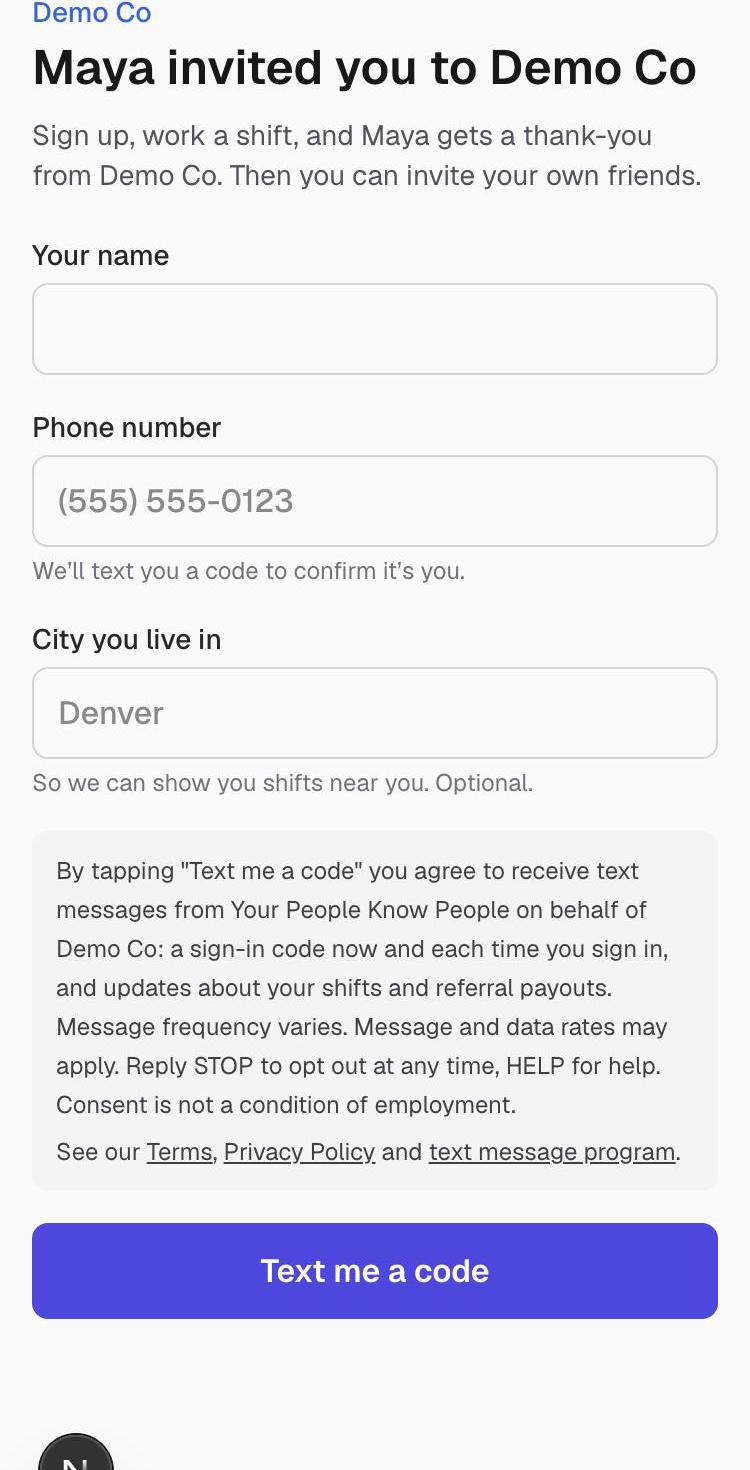
A worker reaches Your People Know People only through a personal invite link from a friend at their staffing company. The sign-up page asks for their name and mobile number. Directly above the “Text me a code” button, the page states what texts they will get and how to opt out. Tapping the button sends the first text (a sign-in code). This is the consent step:
Screenshot of the sign-up page (/join/[code])
The consent wording, as text
By tapping "Text me a code" you agree to receive text messages from Your People Know People on behalf of Demo Co: a sign-in code now and each time you sign in, and updates about your shifts and referral bonuses. Message frequency varies. Message and data rates may apply. Reply STOP to opt out at any time, HELP for help. Consent is not a condition of employment.
See our Terms, Privacy Policy and text message program.
“Demo Co” is replaced by the name of the worker’s own company.
Returning workers (/me/login)
A worker who already has an account signs in with their number and sees this under the form:
By tapping "Text me a code" you agree to receive a sign-in code by text from Your People Know People. Message and data rates may apply. Reply STOP to opt out, HELP for help. See our Terms, Privacy Policy and text message program.
Program details
Who gets texts, what they get, frequency, cost and how to stop: /sms. Policies: Terms of Service and Privacy Policy.